Ember Time Sheets: Get Technician Hours Right Before They Hit Payroll
Still tracking technician hours on time cards? Ember Time Sheets captures hours as the work happens and sends them straight to payroll.

Capture real worked time as part of the inspection, tie it to the job, and send a clean weekly timesheet straight to payroll. No second system, no re-keying, no rounding up after the fact.
Time cards, spreadsheets, pieced-together tools. For a lot of contractors, technician hours are still tracked outside the system running the rest of the business, which means someone is always rebuilding them by hand before payroll.
Ember Time Sheets closes that gap in a different way. Instead of bolting a separate clock app onto your operation, Ember captures technician hours as a natural part of the inspection and service work your team is already doing in Ember. The hours come out of the job itself, land on a weekly timesheet, and flow to payroll without anyone rebuilding them by hand.
Ember Time Sheets fixes that by capturing hours as part of the inspection and service work your team is already completing in Ember. No separate clock app, no re-keying. The time comes out of the job itself and flows straight to payroll.
Hours Captured as Part of the Job
Time Sheets fit the way your team already works in Ember, and it captures time one of two ways depending on how your company is set up.
- Appointment-based. When a Technician marks an appointment Complete, Ember creates the timesheet entry from the scheduled start and end times. It is the lighter-touch option for teams who schedule tightly.
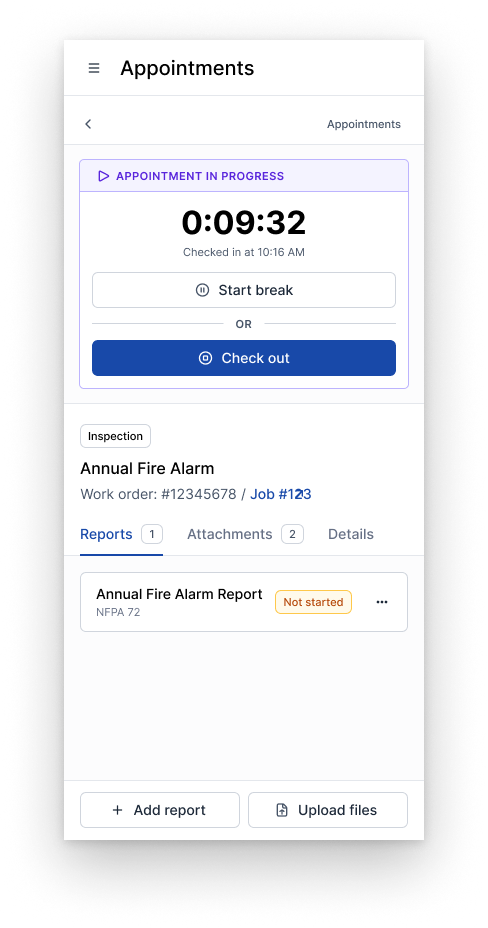
- Check-in / check-out. Technicians check in when they start working and check out when they stop, so the timesheet reflects the time actually spent on site rather than what was blocked on the calendar.
Either way, the weekly timesheet fills in from appointment activity, so your Technicians are reviewing hours, not building them from scratch at the end of the week.
Real Worked Time, Not Rounded Guesses
With check-in / check-out on, the clock runs from the moment a Technician checks in to the moment they check out, minus any break time. Breaks are a one-tap pause, so lunch never quietly lands on the clock. If a Technician leaves a site and comes back, a quick re-check-in starts a fresh session, and each session shows up as its own line, so the day is easy to read instead of one rounded block.
There is also a simple guardrail in the background: a Technician cannot be checked into two appointments at once. If they try, Ember points them back to the job they are still on. It is a small thing that keeps the same hour from landing on two jobs before it ever reaches payroll.
For an owner, this is the difference between paying for time that was actually worked and paying for an estimate someone wrote down after the fact.
Built for Multi-Tech Jobs
Plenty of inspections and service calls put more than one Technician on site, and Time Sheets keep each person's hours straight. Every technician assigned to an appointment checks in and out on their own and builds their own entry, so a two- or three-tech job produces accurate hours per person instead of one shared guess. From the office, your Service Manager can see which Technicians are checked in on a job.
If a teammate forgets to check out at the end of a long day, the lead Technician can close out the job with Force checkout and complete, so one forgotten tap does not hold up the paperwork.
A Weekly Timesheet Your Office Isn't Rebuilding by Hand
At the end of the week, the Technician opens their timesheet, gives it a look, and submits. Because the entries are already filled in from completed appointments and check-ins, most of the review is just confirming what is there. Anything that needs a small fix gets edited right in the row, and changes save on their own.
From there it moves to the Service Manager:
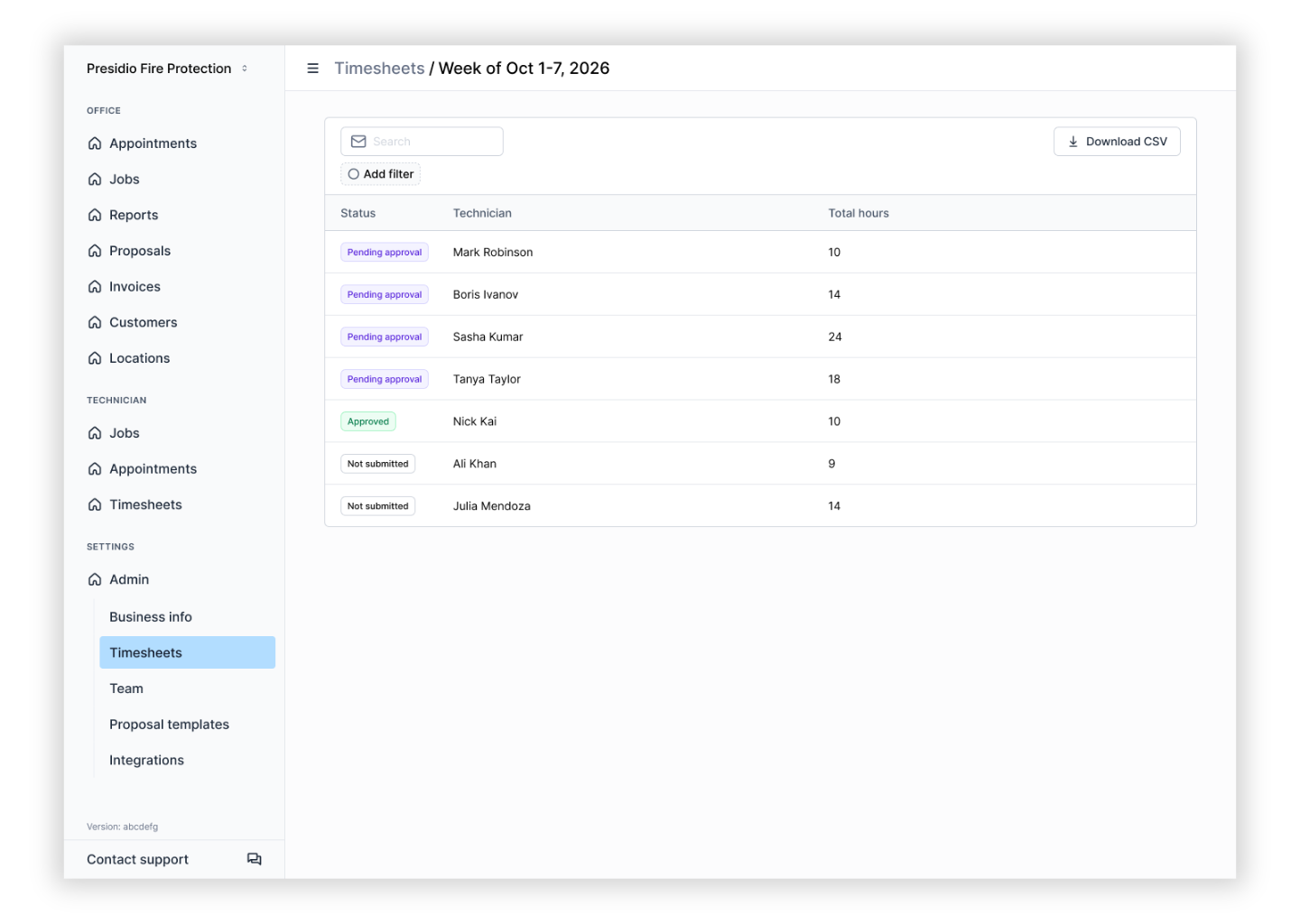
- See every week at a glance, with counts for what is still outstanding, pending approval, and approved.
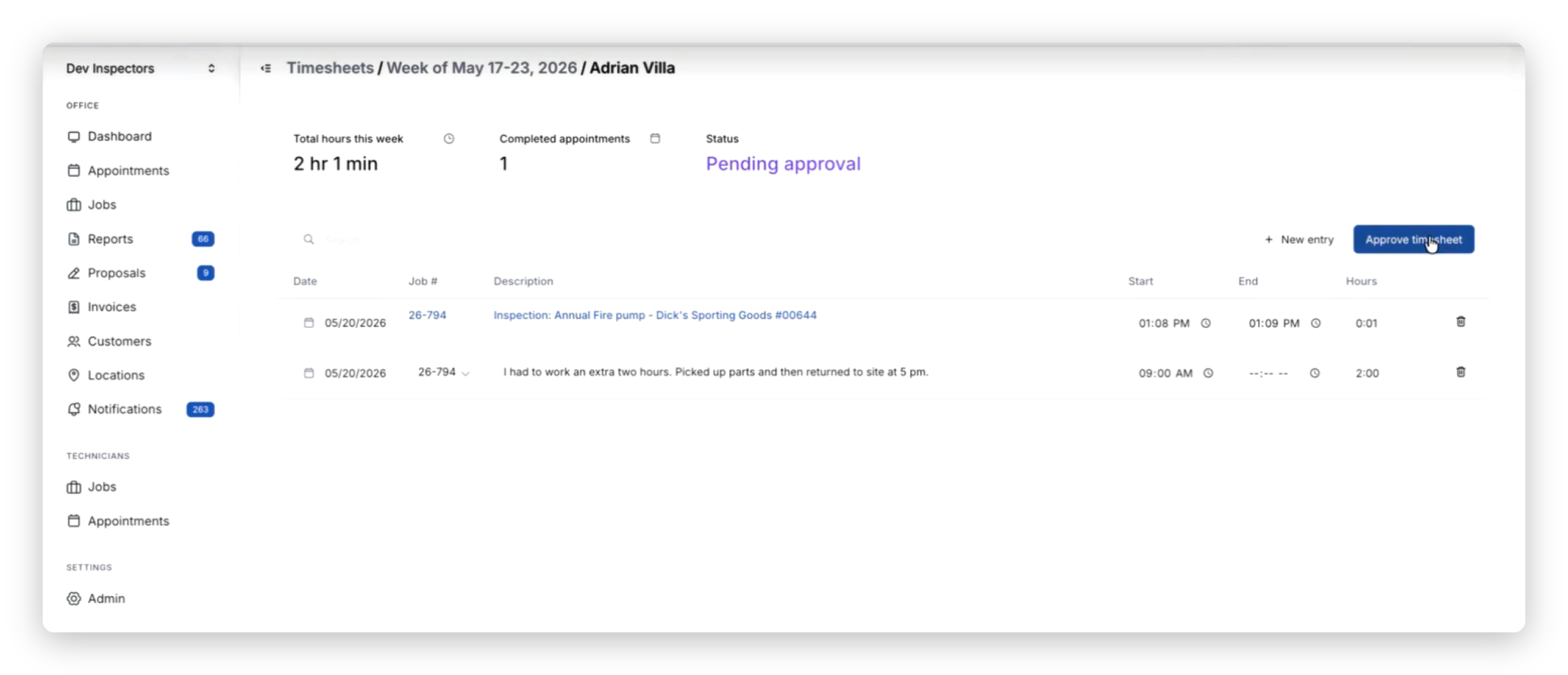
- Open any Technician's timesheet, make a correction if needed, and approve it. Once approved, it locks so the numbers stay put.
- Export to CSV for payroll, either a full week across the team or a single approved timesheet on its own.
This is where the admin drag disappears. Instead of chasing time cards and re-keying hours into your books, the office reviews what the field already captured and sends it on.
Lock the Times So Payroll Can Trust Them
For contractors who need records that hold up for payroll, billing, or compliance, Time Lock is an optional setting that makes a Technician's recorded start and end times read-only. The Technician can still fix a description, but the captured clock-in and clock-out times cannot be changed after the fact. Paired with check-in / check-out, where Ember captures those times automatically, it gives you a clean record of when work actually happened. And because it is set per Technician, you can apply it where you need it and leave it off where you do not.
Hours Tied to the Actual Job
Every entry shows which appointment and job the hours came from, and that detail follows straight through to the export. For an owner, that is the part time cards never delivered. Instead of a stack of hours with nothing connecting them, you can see where the time went, by job, in one place.
From Time Cards to Real Scale
The reason this matters is not really the timesheet on the screen. It is what manual hour-tracking quietly costs a growing contractor: overpaid labor, payroll disputes, and a back office that gets busier every time you add a truck. Southern Kentucky Fire & Sprinkler went from hand-tracking hours on time cards to running their whole operation, from a small inspection to a large construction job, through one connected system, and increased their capacity 25x without adding overhead.
When the way you track time keeps up with the way you grow, the office stops rebuilding hours by hand and you start running payroll from numbers you trust.
If you're currently paying for a separate time-tracking solution, you may be able to eliminate that expense. Time Sheets & Check-In features are included as part of Ember’s subscription at no additional cost.
Ready to get your technician hours right before they hit payroll? Book a demo and see Time Sheets in Ember.
News & Resources


Ready to simplify your fire inspection workflow?
Get a Free Demo